
Overview
Families: Multi-Event Series & Sessions
Link events into parent-child hierarchies. Run conferences where guests select sessions and get separate calendar invites. Track participation across quarterly dinner series and roadshows.
A conference has twelve sessions. How do you track who’s attending which ones without spreadsheet chaos?
Manually copying guests across related events creates version control nightmares. One person updates the wrong list. Someone gets double-invited. You lose track of who’s actually attending what.
Guests sync upward automatically
Add someone to a child event. They appear in the parent list. No manual copying. One direction only.
Build series from one canvas
Create a parent and five children in under two minutes. Visual organization shows which events belong together.
How Families Work
Section titled “How Families Work”Families connect events and lists into parent-child hierarchies.
Most teams keep it simple with one parent and several children. Depth is there when you need it.
One rule matters: guests bubble UP, never down. Add someone to a child event, they appear in the parent automatically. Add someone to the parent? Nothing happens in children.
What syncs vs. what doesn't
Syncs upward:
- Guest presence on the list
Stays independent per event:
- RSVP status
- Attendance records
- Survey responses
- Seating assignments
Each event handles its own communications. Confirmation emails, campaigns, calendar invites.
The Child Guestlist column
When you create children under a parent, a Child Guestlist column appears in the parent’s guest list.
Shows which child events each guest has been added to. Click the dropdown to add or remove guests from children without leaving the parent.
Shows presence only. Not RSVP status. Add columns from “Other Events/Lists” in your Columns drawer to see actual status.
Multi-level hierarchies
Families can go deeper than parent-child. Grandparent, parent, child, grandchild. Guest sync bubbles through all levels.
Multiple parents allowed. A child can have two parents. Keep it flat when possible.
Deletion warning: Removing a guest from a PARENT removes them from ALL children. Removing from a child does NOT remove them from the parent.
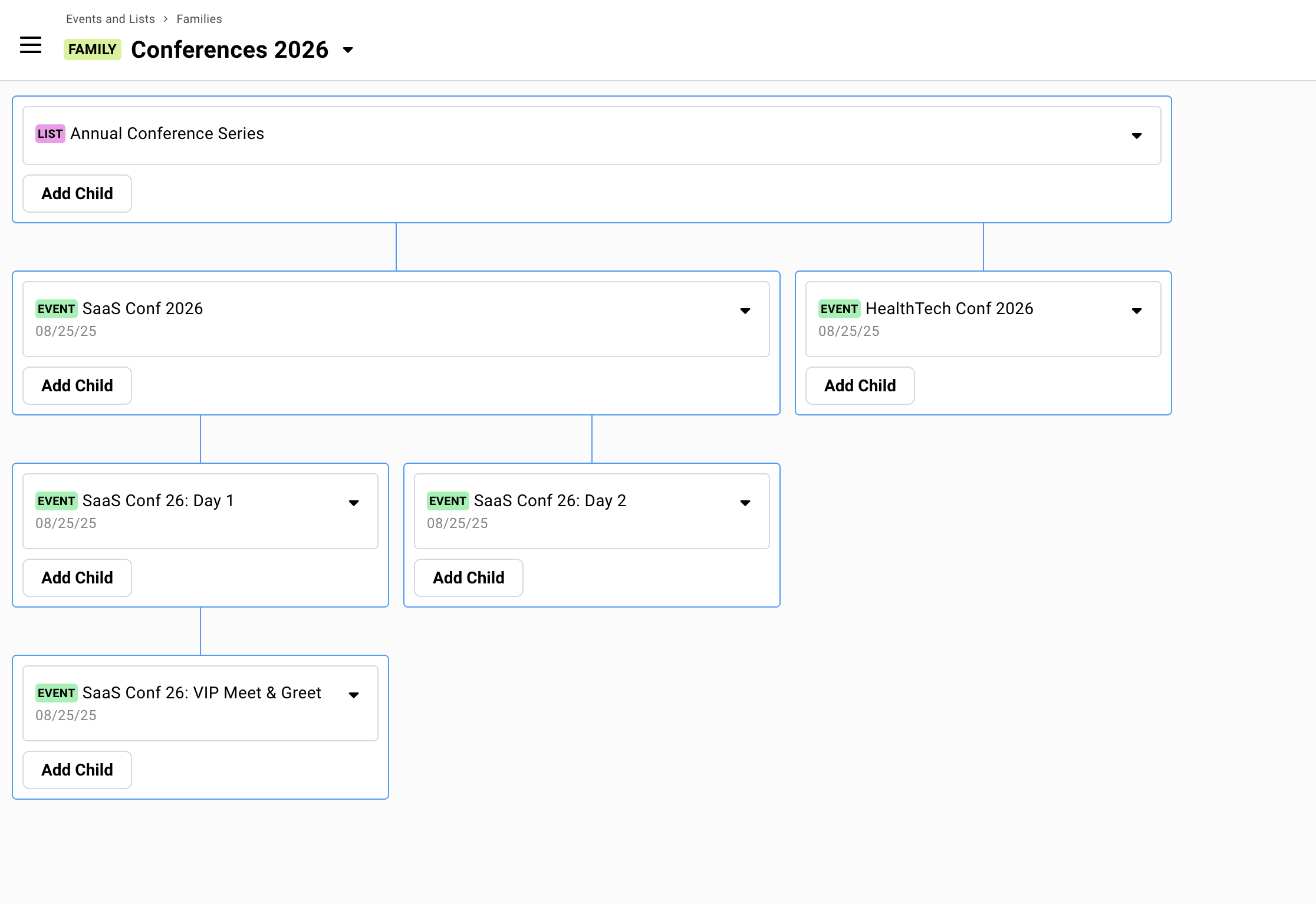
Multi-Event Registration
Section titled “Multi-Event Registration”Families enable easier management of multi-session conferences, summits, and events where guests build their own agenda.
One registration flow. Guests select which sessions they’ll attend. Each session sends its own calendar invite. You see everyone in one consolidated view.
See the setup guide →Creating Families
Section titled “Creating Families”Click Create Family from the Families tab. You’ll start with a blank canvas. Add your parent first, then connect children.
Step by step
-
Click Create Family from the Families tab.
-
Click Add Parent. Choose Create New or Link Existing.
-
Click Add Child. Same options: create new or link existing.
-
Repeat for additional children. Name your family for clarity.
Linking existing events with guests
When you link an existing event as a child, its guests sync upward immediately. No notification sent. They just appear in the parent.
If you link by mistake, you’ll need to manually clean up the parent guest list. Use the guest actions to remove unwanted contacts.
Alternative: Linking from Event Settings
You don’t need the Families tab to create parent-child relationships. Individual events have the option in their settings.
Open any event. Click the dropdown next to the event name. Select Edit Details. Under Advanced Settings, assign a parent or add children.
Same result. Different entry point. The Families tab gives you a visual canvas. Event Settings is faster for single links.
When Families Help
Section titled “When Families Help”Not every multi-event scenario needs families. The main reason to use them: you want all guests across related events visible in one parent list.
Beyond consolidated visibility, families work well for:
Delegating guest curation
Let’s say you have co-hosts or three partners who should suggest guests. But they shouldn’t see each other’s suggestions or the main event.
Give each collaborator their own child list. They add guests there. Guests bubble up to you in your event. They can’t see the parent or each other’s lists.
Clean separation. You get the full picture.
Dashboard across a series (Lists as parents)
Lists work well as parent containers for event series.
Example: “2025 Executive Dinner Series” as a list parent. Q1, Q2, Q3, Q4 dinners as event children. The parent list tracks cumulative participation. Each child handles its own logistics, calendar invites, and RSVPs.
Useful when there’s no single “main event” but you want rollup visibility.
When families are optional
Events share guests but you don’t need central visibility. If each event manages its own list independently, skip the family structure.
You’re using survey questions to add guests to other events. That works without families. Events don’t need to be connected for surveys to add guests across them.
Events are loosely related but managed separately. Not everything needs hierarchy.
Being on a guest list is invisible to guests. Families are purely organizational. Your guests don’t see or know about the structure.
Common Questions
Section titled “Common Questions” Can I convert a standalone event to a parent or child?
Yes. Use the Families tab to link existing events, or go to the event’s Advanced Settings in Edit Details.
What happens if I accidentally delete guests from a parent?
They’re removed from all children in the family. Use Restore Deleted Guests from the Add Guests dropdown if needed. Gatsby shows confirmation warnings before parent deletions.
Do child events need their own landing pages?
Only if guests will register directly for them. If registration happens through a parent with survey questions selecting children, the children typically don’t need landing pages.
How do parent-child relationships (Event Families) work?
Parent-child relationships sync contacts upward from any child up to all connected parents.
Perfect for:
- Event series (create a Parent List with multiple Event children)
- Multi-day conferences (Create a Parent Event with each daily session as children)
- Dashboard/Overview contact tracking (one List collecting from multiple other Events/Lists)
The parent’s guest list shows everyone from all children with a Child Guestlist column tracking which event/list each guest has been added to.
Can't see which child events guests belong to
Add Child Guestlist column to parent event. Shows which child events each guest is present on.